Discovery protocols are Layer 2. They ride directly on Ethernet frames with reserved multicast destinations — no IP stack, no routing protocol, no neighbor relationship beyond "I'm directly cabled to you." When CDP is on (Cisco's default), every Cisco device sends a CDP advertisement out every active interface every 60 seconds. Plug a new switch into a working network and within a minute it sees its uplink, knows the platform of the device on the other end, and announces itself in return.
That convenience is also the protocol's biggest liability. CDP and LLDP advertise hostname, IOS version, platform, native VLAN, IP addresses, and capability flags to anything listening on the wire — including a laptop an attacker just plugged into an unsecured access port. This lab walks through the operational side (read the tables, manipulate the state) and the security side (why you turn CDP off on user-facing and internet-facing ports).
★ WHY DISCOVERY PROTOCOLS EXIST
Before CDP and LLDP, finding "what's on the other end of that cable" meant chasing the cable, reading the port label (if there was one), or logging into both sides and matching MAC tables. In a 48-port closet with three years of cable churn, that's a bad afternoon. Discovery protocols solve three operational problems at once:
Each advertisement carries the sender's hostname, model/platform, and the local interface the advertisement came out of. Look at one switch and you know what's plugged into every port without leaving your seat.
Walk the CDP/LLDP table from one switch to the next and you can reconstruct an entire site's L2 topology — what connects to what, on which interface, at which speed. Tools like SolarWinds and NetBox build maps from this data automatically.
"Why is this port flapping?" — show cdp neighbors detail tells you the platform, IOS version, and native VLAN of the device on the other side. Duplex mismatch, VLAN mismatch, model EOL — three of the four most common port-flap causes show up in one command.
The price of all of that is information disclosure. Anything you'd put on a port label, CDP and LLDP put on the wire — useful for the operator, useful for the attacker.
★ CDP — CISCO DISCOVERY PROTOCOL
CDP is Cisco-proprietary, encoded in SNAP frames, sent to the well-known multicast MAC 01:00:0C:CC:CC:CC. It is enabled by default both globally and per-interface on virtually every Cisco IOS image — meaning the moment you cable two Cisco devices together, they're already talking.
Advertisement: every 60 seconds. Holdtime: 180 seconds — if three consecutive advertisements are missed, the neighbor is aged out of the table. This is the number to know for the exam.
What an advertisement carries:
- Device ID — the sender's hostname (and FQDN if configured).
- Local + remote interface — which port heard it, which port sent it.
- Platform — model number (2911, 2960-24TT, C9300-48P, etc.).
- Capability flags — R = router, S = switch, B = source-route bridge, H = host, I = IGMP, T = transparent bridge, r = repeater, P = phone.
- IP addresses — every Layer-3 address configured on the sending interface.
- IOS version — full version string. Goldmine for CVE lookups.
- Native VLAN — only for trunk ports, but enough info to start VLAN-hopping recon.
- Duplex — useful for mismatch troubleshooting.
The first four show up in show cdp neighbors. The full list comes out of show cdp neighbors detail.
★ LLDP — LINK LAYER DISCOVERY PROTOCOL
LLDP is the open-standard equivalent, ratified as IEEE 802.1AB. Sent to multicast MAC 01:80:C2:00:00:0E. It does the same job as CDP — discover directly-connected neighbors — but speaks a vendor-neutral TLV format that every major switch vendor implements: Cisco, Juniper, Aruba, Arista, HP, Dell, Fortinet, Extreme.
On Cisco IOS, LLDP is disabled by default — both globally and per-interface. You have to opt in with lldp run in global config. (Default-on is CDP's behaviour; LLDP needs explicit consent. Common exam trap.)
Default LLDP timers: advertisement every 30 seconds, holdtime 120 seconds. Faster than CDP — three missed advertisements still age out the neighbor in 90 seconds.
LLDP carries mandatory TLVs (Chassis ID, Port ID, TTL) plus a stack of optional TLVs the vendor implements as it sees fit. Cisco's implementation surfaces system name, system description, port description, capabilities, and management address — close enough to CDP that the output reads almost identically. LLDP-MED (Media Endpoint Discovery) is the extension you'll see for VoIP — phones announce themselves and ask the switch for voice VLAN and PoE class.
When to reach for it: any time you have a mixed-vendor network. Cisco core, Aruba edge? LLDP. Fortinet firewall plugged into a Catalyst? LLDP. Two Cisco devices on a quiet, trusted link with no third-party kit in sight? CDP is fine.
★ THE SECURITY ANGLE — WHY YOU TURN CDP OFF
Plug a laptop into an unsecured access port. Run tcpdump -i eth0 -nn 'ether host 01:00:0c:cc:cc:cc'. Wait 60 seconds. You now have: the switch's hostname (lateral-movement intel), its IP (a target), its IOS version (a CVE lookup), the native VLAN (VLAN-hopping prep), the platform (vendor exploits), and the port you're on (forensic surface).
Mitigation: turn CDP off where it isn't doing operational work. Edge / user access ports, internet-facing interfaces, DMZ uplinks, and anything terminating outside your trust boundary. Keep CDP on for switch-to-switch and switch-to-router uplinks where the operational value is real and the trust boundary holds.
LLDP carries similar info and has the same exposure — same rule of thumb applies. The lab's per-interface disable step (no cdp enable) is the production-pattern command: kill discovery on the ports facing untrusted users while preserving it on inter-switch links.
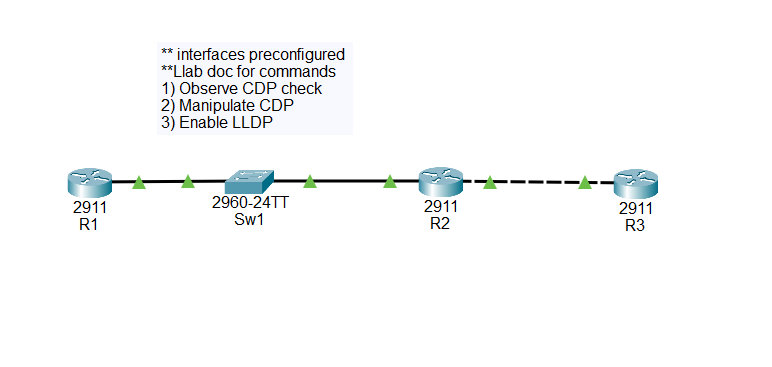
★ TOPOLOGY & ADDRESSING
The .pkt ships with all IP addressing applied — you don't touch a single subnet mask. The lab is pure protocol behaviour, so the addressing exists only to give you a sanity-check ping and a management IP for the switch.
Important: R1, the Sw1 management SVI, and R2 G0/0 all share one broadcast domain through Sw1 (a Layer-2 2960). That means all three need IPs in the same subnet — a /29 fits three hosts with room to spare. R2 G0/1 ↔ R3 G0/0 is a real point-to-point and stays /30.
| DEVICE | INTERFACE | IP / MASK | CONNECTS TO |
|---|---|---|---|
| R1 (2911) | G0/0 | 10.0.12.1/29 (.248) | Sw1 Fa0/1 |
| Sw1 (2960) | VLAN 1 SVI | 10.0.12.2/29 (.248) | — (mgmt) |
| Sw1 (2960) | Fa0/1 / Fa0/2 | L2 access (VLAN 1) | R1 / R2 |
| R2 (2911) | G0/0 | 10.0.12.3/29 (.248) | Sw1 Fa0/2 |
| R2 (2911) | G0/1 | 10.0.23.1/30 (.252) | R3 G0/0 |
| R3 (2911) | G0/0 | 10.0.23.2/30 (.252) | R2 G0/1 |
CDP doesn't cross switches — it advertises to directly cabled devices only. So R1 and R2 are not CDP neighbors of each other; Sw1 sits between them at L2 and terminates the protocol. Expect:
- R1 sees → Sw1 (1 neighbor)
- Sw1 sees → R1, R2 (2 neighbors)
- R2 sees → Sw1, R3 (2 neighbors)
- R3 sees → R2 (1 neighbor)
★ TASK 1 — OBSERVE CDP
Open consoles on all four devices. CDP is on by default everywhere, so you should be able to read neighbor tables immediately — no config required.
- On each device run
show cdp neighborsandshow cdp neighbors detail. - Record the Device ID, platform, local interface, and remote interface for every neighbor.
- On R1, run
show cdpand note the advertisement timer and holdtime.
Move to show cdp neighbors detail on Sw1 — the verbose form is where the security-interesting fields live:
One show cdp neighbors detail just gave you every neighbor's IP, platform, IOS version, duplex. Imagine the equivalent on a 200-device site — that's a complete topology map and software-inventory leak, free of charge to anyone on the wire.
Finally check the global timers on R1:
★ TASK 2 — MANIPULATE CDP
Three sub-steps, each one a real-world operational task.
2A — DISABLE CDP GLOBALLY ON R1
Now wait up to 180 seconds (R1's last advertisement times out of Sw1's table after the holdtime expires) and check Sw1:
R1 has dropped off Sw1's neighbor table — disabling CDP globally stopped R1's outbound advertisements, and Sw1 aged the entry out at holdtime expiry. R2's table never had R1 in it in the first place, because CDP doesn't cross switches — Sw1 is the L2 boundary for the protocol.
2B — RE-ENABLE CDP ON R1
R1 is back. Note that the recovery time is one advertisement cycle (~60 s), not the full holdtime — as soon as Sw1 hears one packet from R1, the table entry is created with a fresh 180 s holdtime.
2C — DISABLE CDP ON ONE INTERFACE ONLY
This is the production-pattern command — kill discovery on a specific port without affecting any other CDP-enabled interface on the same device.
Wait for the holdtime to expire, then verify on Sw1:
R1 disappeared from Sw1's table again — but this time CDP is still globally enabled on R1. If R1 had another interface (e.g., G0/1) with another CDP-speaking neighbor, that one would be unaffected. no cdp enable at the interface is the surgical version of no cdp run globally.
Re-enable for the rest of the lab so LLDP comparisons have a baseline:
★ TASK 3 — ENABLE LLDP
LLDP is off by default on Cisco. Turn it on globally on every device, then read the neighbor tables and compare against what CDP showed.
Same shape as CDP, faster holdtime (120 vs 180). Verbose form pulls back more TLVs:
LLDP gives you essentially the same operational data as CDP — system name, port, IOS version, IP, capabilities. The big absence in standard LLDP output is anything Cisco-specific — CDP advertises native-VLAN-mismatch warnings, VTP domain, and trust-state info that's outside the IEEE spec. For a pure Cisco shop you'd miss those if you ran LLDP only; for a mixed-vendor shop you'd never have had them anyway.
★ TASK 4 — ANALYSIS QUESTIONS
Work through these in writing before peeking at the answers below. They're the kind of question CCNA writes around topic 2.3.
- Why disable CDP on internet-facing interfaces?
- Which protocol would you use in a mixed-vendor environment?
- What is the default CDP holdtime?
- How could CDP output be used against you by an attacker?
- Information disclosure to untrusted networks. An internet-facing port has the public internet on the other side. CDP advertises hostname, IOS version, IP addressing, and platform model on every advertisement — that's free reconnaissance for anyone scanning your edge.
no cdp enableon the WAN/edge port shuts it off without affecting CDP elsewhere on the device. - LLDP — IEEE 802.1AB. It's the open-standard alternative every major vendor implements, so a Cisco/Aruba/Juniper/Fortinet network can still build a neighbor table end-to-end. CDP only works between Cisco devices. (Real-world: in a mixed shop, leave CDP on for the Cisco-to-Cisco uplinks and run LLDP everywhere on top — they coexist fine.)
- 180 seconds. Advertisement timer is 60 s; the holdtime is 3× the advertisement timer so a neighbor that's missed three packets in a row ages out. Tuneable with
cdp timerandcdp holdtimein global config — leave it alone unless you have a specific reason. - Reconnaissance and exploit-targeting. CDP leaks IOS version (CVE lookup), platform model (vendor-specific exploits), native VLAN (VLAN-hopping prep), management IP (the actual target), and hostname (lateral-movement intel). On a compromised access port, one CDP frame replaces hours of nmap scanning. Defence:
no cdp enableon every user-facing access port and edge interface.
★ VERIFICATION CHECKLIST
- ☐ CDP neighbors visible on all four devices before any config changes (R1: 1, Sw1: 2, R2: 2, R3: 1).
- ☐ CDP disabled globally on R1 with
no cdp run— R1 disappears from Sw1's table after holdtime. - ☐ CDP re-enabled on R1 with
cdp run— R1 reappears on Sw1 within one advertisement cycle (~60 s). - ☐ CDP disabled per-interface on R1 G0/0 with
no cdp enable— only that link goes dark; CDP is still globally on. - ☐ LLDP enabled on all four devices with
lldp run— neighbors visible inshow lldp neighborswithin ~30 s. - ☐ All four analysis questions answered.
★ COMMON GOTCHAS
Symptom: "I ran no cdp run on R1 but R1 is still showing on Sw1's table."
Fix: CDP entries age out at holdtime (180 s), not advertisement time. You need to wait up to 3 minutes for the neighbor to drop. Speed it up with clear cdp table on Sw1 if you're impatient.
Symptom: "Why doesn't R2 see R1 — they're on the same subnet."
Fix: Subnet membership is L3. CDP/LLDP advertise at L2 and are not forwarded by switches. Sw1 sits between R1 and R2 on the wire, so each end only sees Sw1 as a CDP neighbor. The same logic applies to STP BPDUs, LACP, and any other "link local" L2 protocol.
Symptom: lldp run rejected with "% Invalid input".
Fix: It's a global config command. Enter configure terminal first; lldp run is not valid at the privileged-exec prompt.
Symptom: Turning off CDP on one port also kills it for the whole device, or vice versa.
Fix: no cdp run is global (under config t). no cdp enable is per-interface (under interface gX/X). Easy to confuse — both contain the word "cdp" — but they live at different scopes.
Symptom: "I disabled CDP and my Cisco devices still see each other in show lldp neighbors."
Fix: CDP and LLDP run independently. Disabling one has no effect on the other. To go fully dark on a port, disable both: no cdp enable and no lldp transmit + no lldp receive.
★ VERIFICATION CHEAT SHEET
★ THINGS WORTH TRIGGERING
On R1, run cdp timer 15 and cdp holdtime 45 in global config. The advertisement now goes out every 15 s and ages out in 45 s. Watch Sw1's show cdp neighbors — the Holdtme column for R1 cycles 45→15→0 visibly. Then reset with no cdp timer and no cdp holdtime.
From Sw1, run clear cdp table. The table empties instantly. Run show cdp neighbors immediately — empty. Wait one advertisement cycle (~60 s by default) and entries rebuild as each neighbor sends its next packet. Useful when you've changed a peer's hostname and want CDP to update without waiting for natural ageing.
On R2 G0/1, run no cdp enable then leave LLDP running. R3 should still see R2 in show lldp neighbors but no longer in show cdp neighbors. This is the realistic pattern when you're slowly migrating a mixed network from CDP-only to LLDP everywhere — disable CDP per-port as each end of the link gets LLDP turned on.
In Packet Tracer's Simulation mode, filter for CDP only and step through one advertisement from R1 → Sw1. You'll see the destination MAC 01:00:0C:CC:CC:CC, the SNAP encapsulation, and the TLV list. Every field you saw in show cdp neighbors detail is on the wire in cleartext.
★ COMPARE TO LAB 7 — WHEN CDP SAVES YOU
In Lab 7 (EtherChannel) the very first step on every access-switch task was show cdp neighbors — without it, you'd be guessing which two of Sw1's four available ports actually face Sw2 (LACP target) versus Sw3 (Static target). That guess is how single-member EtherChannels get built and quiet outages start.
The takeaway: CDP and LLDP are operations infrastructure. You don't run them because the exam asks; you run them because every other config decision benefits from knowing what's actually on the other end of the cable. The security trade-off matters at the boundary — between you and untrusted networks — not on the well-known inter-switch uplinks in your wiring closet.
★ LAB DOWNLOAD
Built and tested in Packet Tracer 8.x. All IP addresses and hostnames are pre-configured — you bring up CDP/LLDP behaviour only. Plan on ~45 minutes including the analysis questions.
Pre-addressed /29 LAN segment + /30 point-to-point — protocol behaviour only ⬇ DOWNLOAD .PKT
Watching real CDP/LLDP frames cross a real switch makes the L2-scoped concept stick. 2960X + console cable. Amazon affiliate.