Static routes are the first routing tool you'll learn and the last one you'll stop using. They scale poorly past a handful of routers, but they're deterministic, free of CPU cost, and the only way you'll fully understand what a routing protocol is replacing. This lab uses six routers to build full reachability with nothing but ip route. The R200↔R40 link arrives with OSPF already running between the two routers — that gives you a working dynamic adjacency to compare your statics against, so administrative distance becomes a thing you can see rather than just a number on a chart.
The payoff at the end is a single concept: lower AD wins. Static defaults to 1, OSPF to 110, so static always wins by default. But change one static's AD to 120 and the contest flips — that's a floating static route, the standard idiom for backup paths that only activate when the primary protocol dies.
★ WHY STATIC, WHY FLOATING
Three reasons static routes still exist in 2026 networks:
Every branch router that has exactly one path to the rest of the network points a default static (0.0.0.0/0) at its upstream and never runs a protocol on that edge. Simpler, lighter, more predictable.
Send a single prefix down a non-default path — VPN traffic over a tunnel, scrubbed traffic to a security appliance, management traffic over an out-of-band link. A static route is the cleanest tool for "this one destination goes a different way".
A static route with an AD higher than the dynamic protocol's AD installs only when the dynamic route disappears. Used for cellular failovers, dual-WAN routers, and any "if the main link dies, fall back to this one" pattern.
★ ADMINISTRATIVE DISTANCE — THE TIE-BREAKER
When two sources offer a route to the same prefix, IOS picks the one with the lower AD. Memorize these — they're CCNA-direct material:
| SOURCE | DEFAULT AD | NOTES |
|---|---|---|
| Connected | 0 | Directly attached subnet — always wins. |
| Static | 1 | Manually configured. Override with a trailing AD value. |
| EIGRP (internal) | 90 | Cisco hybrid IGP. |
| OSPF | 110 | Open-standard link-state IGP. |
| IS-IS | 115 | Open-standard link-state IGP — ISP backbones. |
| RIP | 120 | Distance-vector. Mostly historical. |
| External BGP | 20 | Internet backbone routing. Trusted between ASes. |
| Internal BGP | 200 | BGP inside an AS. |
AD only comes into play when the two competing routes have the same prefix length. A specific OSPF /24 will beat a static default /0, even though OSPF's AD is higher — because longest prefix match runs first. AD is the second tiebreaker.
★ IP ADDRESSING TABLE
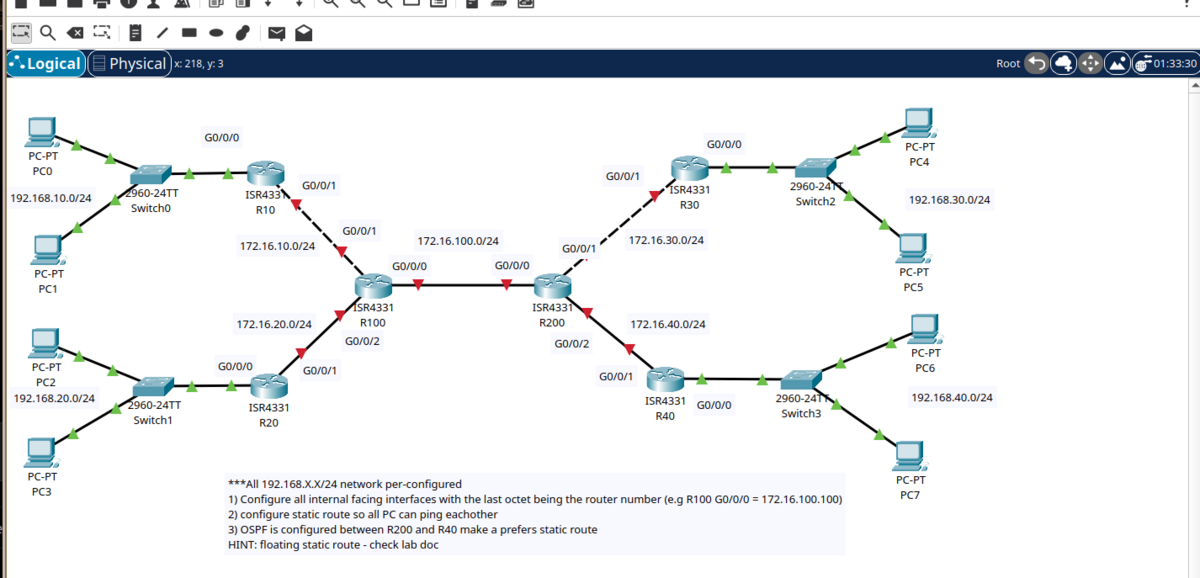
Two conventions in play. On the 172.16.x.x inter-router links, every interface's last octet matches the router number — R100 G0/0/0 = 172.16.100.100, R200 G0/0/2 = 172.16.40.200, and so on. On the 192.168.X0.0/24 LANs, the router uses .254 as the gateway (matches what the PCs are pre-configured to point at). Rows marked PRE are configured in the .pkt before you open it — you bring up the ten rows marked YOU.
| DEVICE | INTERFACE | IP / MASK | FACING | STATUS |
|---|---|---|---|---|
| R10 | G0/0/0 | 192.168.10.254/24 | PC0 / PC1 LAN (gw) | PRE |
| R10 | G0/0/1 | 172.16.10.10/24 | ↔ R100 G0/0/1 | YOU |
| R20 | G0/0/0 | 192.168.20.254/24 | PC2 / PC3 LAN (gw) | PRE |
| R20 | G0/0/1 | 172.16.20.20/24 | ↔ R100 G0/0/2 | YOU |
| R100 | G0/0/0 | 172.16.100.100/24 | ↔ R200 G0/0/0 | YOU |
| R100 | G0/0/1 | 172.16.10.100/24 | ↔ R10 G0/0/1 | YOU |
| R100 | G0/0/2 | 172.16.20.100/24 | ↔ R20 G0/0/1 | YOU |
| R200 | G0/0/0 | 172.16.100.200/24 | ↔ R100 G0/0/0 | YOU |
| R200 | G0/0/1 | 172.16.30.200/24 | ↔ R30 G0/0/1 | YOU |
| R200 | G0/0/2 | 172.16.40.200/24 | ↔ R40 G0/0/1 (OSPF) | YOU |
| R30 | G0/0/0 | 192.168.30.254/24 | PC4 / PC5 LAN (gw) | PRE |
| R30 | G0/0/1 | 172.16.30.30/24 | ↔ R200 G0/0/1 | YOU |
| R40 | G0/0/0 | 192.168.40.254/24 | PC6 / PC7 LAN (gw) | PRE |
| R40 | G0/0/1 | 172.16.40.40/24 | ↔ R200 G0/0/2 (OSPF) | YOU |
PCs are pre-addressed and the four branch routers' LAN-side G0/0/0 interfaces (R10, R20, R30, R40) ship pre-configured as the gateway at .254. The two core routers (R100, R200) have no G0/0/0 config — you'll bring those up in Task 1 along with G0/0/1 and G0/0/2. Each PC's default gateway is the router's LAN .254 — PC0 (192.168.10.1/24) → 192.168.10.254, and so on.
★ TASK 1 — INTERFACE CONFIG
Six routers, ten interfaces left to bring up. G0/0/0 is pre-configured on the four branch routers (R10/R20/R30/R40 facing their PC LANs) — open each one and confirm with show ip interface brief. The two core routers (R100, R200) have nothing pre-configured: you'll bring up all three of their interfaces (G0/0/0, G0/0/1, G0/0/2) yourself. The rule for the inter-router 172.16.x.x links is one sentence: every IP ends with the router number.
G0/0/0 on the four branch routers (R10, R20, R30, R40) ships pre-configured as the LAN-side gateway at .254. PC addressing is pre-loaded with that .254 as the default gateway. R100 and R200 have no interface config — those are on you. Bring up the ten interfaces marked YOU in the addressing table.
Sanity-check each new link with a ping from one side to the other before moving on. If R10 ping 172.16.10.100 fails, no routing will fix it — go find the layer-1 / layer-2 problem first.
★ TASK 2 — STATIC ROUTES SO ALL PCs CAN PING
Every PC needs to reach every other PC. Each router only has direct knowledge of its own connected networks — anything beyond a single hop needs an explicit ip route. Two patterns to use:
Branch routers (R10, R20, R30) have one path to everything that isn't local — point a default at the core. One line replaces six.
Core routers (R100, R200) sit between many destinations. They need a specific /24 per remote LAN so they can pick the right next hop.
R40 is a leaf, but we configure specific /24 statics with an explicit AD of 100. Two reasons: in task 3 we want overlapping prefixes between static and OSPF so the AD comparison is meaningful (a default route wouldn't compete with an OSPF /24 — longest prefix wins before AD), and pinning AD = 100 keeps the static below OSPF's AD 110 by an obvious margin so the route table shows [100/0] instead of the implicit [1/0]. Easier to read, easier to teach.
WHAT EACH PIECE DOES
"To reach this destination, send the packet to this neighbour's IP." IOS recursively looks up the next hop in its own table to find which interface to use. Cleanest form for production. AD defaults to 1.
Same thing, but with the exit interface named directly. Works fine on point-to-point links; on multi-access segments it forces ARP-for-every-destination, which scales badly. Avoid except for /30 P2P.
A trailing number overrides the default AD of 1. Use a value below the competing protocol's AD to keep static preferred, or above it for a floating backup. On R40 we use 100 (below OSPF's 110) so the lab clearly shows the AD field in the route table.
The default route, sometimes called the "gateway of last resort". Matches anything not matched by a more specific route. Branch routers live on these.
★ VERIFY — END-TO-END PINGS
From PC0 (192.168.10.1) on the far left, ping a PC in each remote LAN.
Trace one path so you can see the static routes being followed.
Every PC can reach every other PC over four hops at most. Zero dynamic routing protocols involved — purely manual configuration on six routers.
★ TASK 3 — OSPF IS ALREADY UP, AND STATIC WINS BY AD
OSPF is pre-configured on R200 and R40 in the .pkt file. The other four routers stay static-only. Your job is to confirm the adjacency is live, then look at R40's routing table to see that your statics at AD 100 beat OSPF's 110 on every contested prefix.
For reference, the OSPF config shipped in the .pkt looks roughly like this — you don't need to type it.
R200 — process 1, router-id 200.200.200.200, networks 172.16.40.0/24, 172.16.30.0/24, 172.16.100.0/24 in area 0, passive on g0/0/0 (to R100) and g0/0/1 (to R30).
R40 — process 1, router-id 40.40.40.40, networks 172.16.40.0/24 and 192.168.40.0/24 in area 0, passive on g0/0/0 (LAN).
Confirm the adjacency reached FULL.
If either side shows anything other than FULL, the pre-config didn't survive the .pkt save — see the OSPF troubleshooting steps in Lab 5.
★ INSPECT R40'S ROUTING TABLE
R40 now has two routes for 172.16.30.0/24 — one static at AD 100 (configured in Task 2), one OSPF at AD 110 (just learned from R200). Both have the same prefix length, so AD is the tiebreaker — and 100 is lower than 110.
No O entries — the OSPF routes lost the AD contest and never installed. The [100/0] in each line is the proof: first number is administrative distance (matches the trailing 100 from the Task 2 commands), second is metric. To prove the OSPF routes exist as candidates, check the LSDB directly.
OSPF is up, the adjacency is FULL, and every contested prefix shows S (static, AD 100) instead of O (OSPF, AD 110). Static is preferred — not by default this time, but by an explicit AD we pinned to make the contest legible.
★ BONUS — FLIP IT WITH A FLOATING STATIC
"Floating static" means a static route with an AD high enough that the dynamic protocol wins under normal conditions; the static only takes over when the dynamic route disappears. The use case is real: cellular failover, dual-WAN, anywhere you want "main path normally, this static as backup".
On R40, replace one of the existing AD-100 statics with one that has an AD of 120 (higher than OSPF's 110).
Check the table — OSPF should win this time.
Now simulate a single-prefix OSPF withdrawal and watch the static float in. Easiest way without disturbing the pre-configured OSPF process: temporarily remove one network statement on R200 so it stops advertising that prefix into OSPF. R40 loses the OSPF route, the AD-120 static takes over.
The route to 172.16.30.0/24 is back — same next hop, but now via the AD-120 floating static. End-to-end ping still works.
A floating static only protects against routing-protocol failure, not link failure. If the underlying interface (G0/0/1 on R40) goes down, the static's next hop becomes unreachable and the route drops out regardless of AD. For true link-failure failover you need a second physical path, which this single-link topology doesn't provide. Production-grade designs combine floating statics with IP SLA tracking — outside CCNA scope but worth knowing exists.
Restore the pre-configured OSPF advertisement on R200 so the lab is back to its shipped state:
★ COMMON GOTCHAS
Symptom: PC0 can ping PC4 but PC4 can't ping PC0.
Cause: You configured the static on one side of the path but forgot the return route on the other. Every router in both directions needs an entry for both source and destination.
Symptom: Route installs but doesn't forward.
Fix: The next-hop IP must be on the same subnet as one of your interfaces. R10's next hop is 172.16.10.100, not 172.16.10.10 (that's R10 itself).
Symptom: You added a static and expected it to win, but the OSPF route is still installed.
Fix: Confirm the prefix lengths match. A static 0.0.0.0/0 will never beat an OSPF /24 — longest prefix runs before AD.
Symptom: Floating static demo doesn't flip — OSPF never installs.
Fix: Adding ip route X.X.X.X Y.Y.Y.Y Z.Z.Z.Z 120 when an AD-100 entry already exists creates a second static rather than replacing the first — both stay in the config and the lower AD still wins. Remove the original with the full no ip route ... 100 command (matching the AD) before adding the new one.
★ VERIFICATION CHEAT SHEET
★ THINGS WORTH TRIGGERING
On R100, no ip route 192.168.30.0 255.255.255.0 172.16.100.200. Ping PC0 → PC4 — now black-holed at R100. A single missing return route can break end-to-end reachability across a network. This is why static routing doesn't scale.
Re-add the static with the exit interface instead of the next-hop IP: ip route 192.168.30.0 255.255.255.0 g0/0/1. Works in Packet Tracer; in production, this forces ARP-for-every-remote-IP on multi-access segments. Look at show ip arp to see the proxy ARP entries pile up.
Open a continuous show ip route on R40 in one CLI tab. In another tab, run no network 172.16.30.0 0.0.0.255 area 0 under router ospf 1 on R200. Watch OSPF withdraw the prefix, the AD-120 floating static install, the route flip in real time. Then re-add the network statement and watch OSPF preempt.
Lab 5 (OSPF single-area) gets the same end-to-end reachability with zero static routes — just two devices talking OSPF. Sit with that contrast: 22 static lines here vs. a few network statements there. That's the value of running an IGP.
★ LAB DOWNLOAD
Built and tested in Packet Tracer 8.x. PCs are pre-addressed; interface IPs and routing are yours to build. Plan on ~30 minutes for the full lab including the floating static bonus.
Pre-addressed PCs, all routing config is yours to build ⬇ DOWNLOAD .PKT
Static and floating routes are best understood on real gear where you can yank cables and watch failover happen. 2960X + console cable. Amazon affiliate.