Open the lab
[ YOUR LAB FILE ]
Download the starting topology, then work through the lesson in SwitchLab.
- Save the .swlab file without renaming its extension.
- Open SwitchLab. Import and export controls currently require a desktop-width window. On a smaller screen, Tools → Fit brings the topology into view.
- Select Import Sandbox (folder icon), choose the downloaded file, and confirm the device and cable counts below.
- Select a device, then choose Open device on desktop or its name in the bottom bar on smaller screens. Select CLI for switches/routers or Desktop → Terminal for PCs. Enter
enableonly when the prompt ends in >. - Follow this page beside the simulator. Use a free account to export your work. Reimport the original download to restart; export any work you want to keep first.
Prerequisites
- Complete IPv4 routing and understand interface direction.
Topology
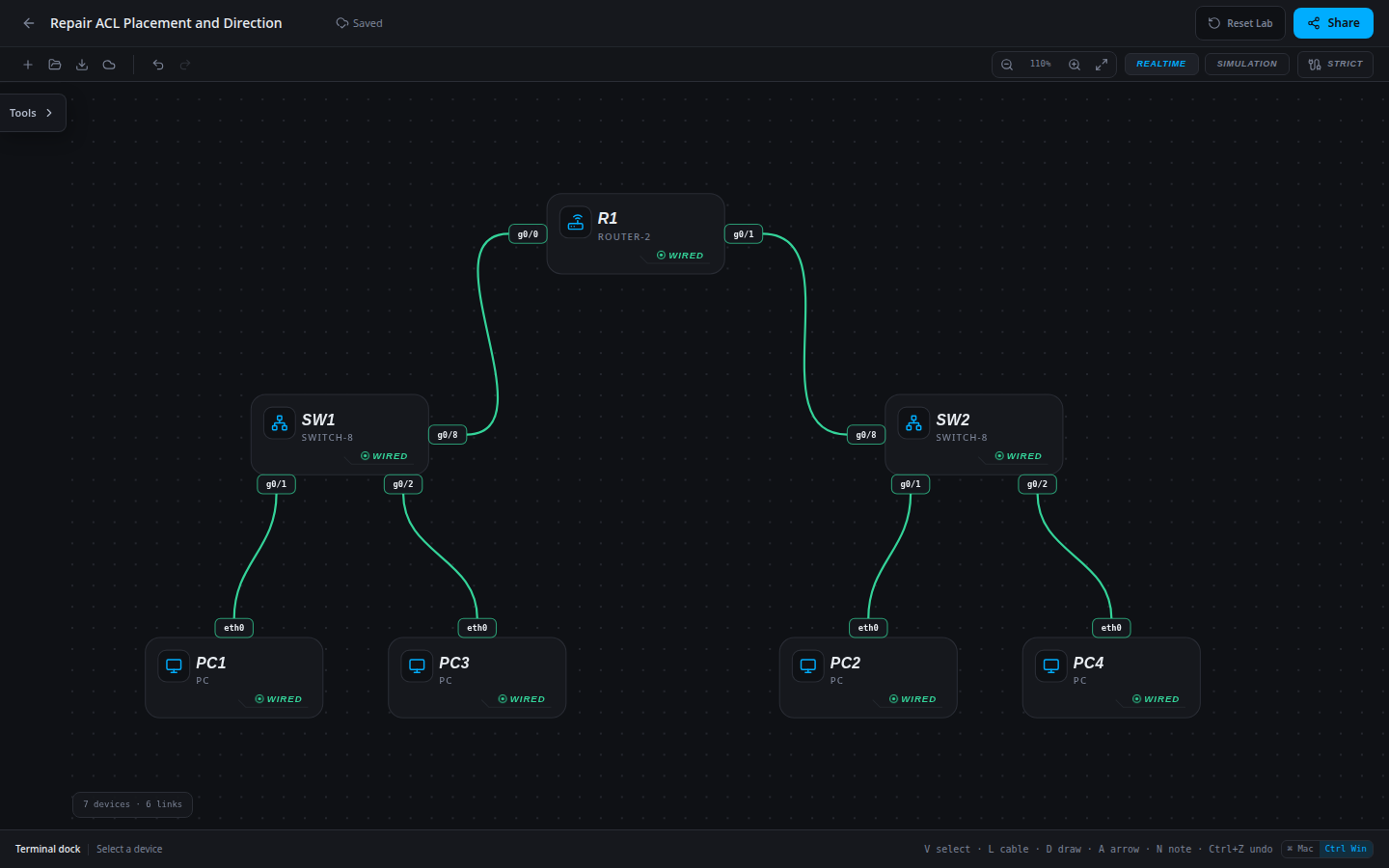
7 devices · 6 links
Scenario
The extended ACL entries are correct, but the list is attached inbound on the resource-facing interface. It does not see the intended Users-to-Resources traffic in that direction. Repair its attachment.
Objectives
- Translate an explicit access policy into ordered ACL entries and interface direction.
- Prove denied paths and allowed controls with real host traffic.
CCNA blueprint
200-301 v1.1 objectives — this lab covers the following specific skills, not every subtopic in the domain.
- 5.6 — Configure and verify IPv4 access control lists using source/destination policy.
Starting information
- Users: PC1=10.10.10.10 (authorized), PC3=10.10.10.30 (restricted), attached through R1 g0/0. Resources: PC2=10.20.20.20 and PC4=10.20.20.40, through R1 g0/1.
- Policy: PC1 reaches both resources. PC3 is denied only to PC2 and remains permitted to PC4.
- Apply ACL 101 outbound on R1 g0/1. Keep all host settings and router addresses unchanged.
- These exercises verify IPv4 source/destination policy with ICMP traffic. They do not claim application-port filtering or stateful firewall behavior.
| Host | IPv4 address | Mask | Gateway |
|---|---|---|---|
| PC1 | 10.10.10.10 | 255.255.255.0 | 10.10.10.1 |
| PC3 | 10.10.10.30 | 255.255.255.0 | 10.10.10.1 |
| PC2 | 10.20.20.20 | 255.255.255.0 | 10.20.20.1 |
| PC4 | 10.20.20.40 | 255.255.255.0 | 10.20.20.1 |
| Router | Interface | IPv4 address | Mask |
|---|---|---|---|
| R1 | g0/0 | 10.10.10.1 | 255.255.255.0 |
| R1 | g0/1 | 10.20.20.1 | 255.255.255.0 |
| Device / port | Device / port |
|---|---|
| R1 / g0/0 | SW1 / g0/8 |
| R1 / g0/1 | SW2 / g0/8 |
| PC1 / eth0 | SW1 / g0/1 |
| PC3 / eth0 | SW1 / g0/2 |
| PC2 / eth0 | SW2 / g0/1 |
| PC4 / eth0 | SW2 / g0/2 |
Tasks
- Test PC1 and PC3 to both resource hosts and record the initial results. Inspect the ACL entries and R1 interface attachment.
- Apply the approved source/destination policy, ordering and outbound attachment. Preserve the unrelated permitted paths.
- Repeat the four-path matrix. A failed forbidden path is insufficient by itself: the allowed control paths must still pass.
- Inspect
show access-listsandshow running-config interface g0/1, then save/export and verify the completed network after reload.
Useful commands
show access-lists
show running-config interface g0/1
copy running-config startup-config
Progressive hints
Hint 1
Draw the packet direction through R1 before choosing an ACL attachment.
Hint 2
ACLs use the first matching entry. Standard ACLs match the source; extended ACLs can also distinguish the destination.
Hint 3
The intended flow exits R1 g0/1. Put the specific deny before the broad permit and apply the list outbound.
Verification
- The final four-path matrix matches the approved policy exactly.
- The intended ACL is applied outbound on R1 g0/1 with no stale inbound attachment.
- Export/reload preserves both permitted and denied outcomes.
Solution / walkthrough
Show Solution
Use enable only from a > prompt; if already at #, begin with configure terminal.
R1
Apply the required first-match policy in the direction traversed by Users-to-Resources packets; retain the explicit permitted control paths.
enable
configure terminal
interface g0/1
no ip access-group 101 in
ip access-group 101 out
end
copy running-config startup-config
Run every verification check above after the changes. A saved configuration alone does not prove packet delivery.