Open the lab
[ YOUR LAB FILE ]
Download the starting topology, then work through the lesson in SwitchLab.
- Save the .swlab file without renaming its extension.
- Open SwitchLab. Import and export controls currently require a desktop-width window. On a smaller screen, Tools → Fit brings the topology into view.
- Select Import Sandbox (folder icon), choose the downloaded file, and confirm the device and cable counts below.
- Select a device, then choose Open device on desktop or its name in the bottom bar on smaller screens. Select CLI for switches/routers or Desktop → Terminal for PCs. Enter
enableonly when the prompt ends in >. - Follow this page beside the simulator. Use a free account to export your work. Reimport the original download to restart; export any work you want to keep first.
Prerequisites
- Complete Configure Your First IPv4 Static Routes.
- Understand why more-specific connected and static routes take precedence over a default route.
Topology
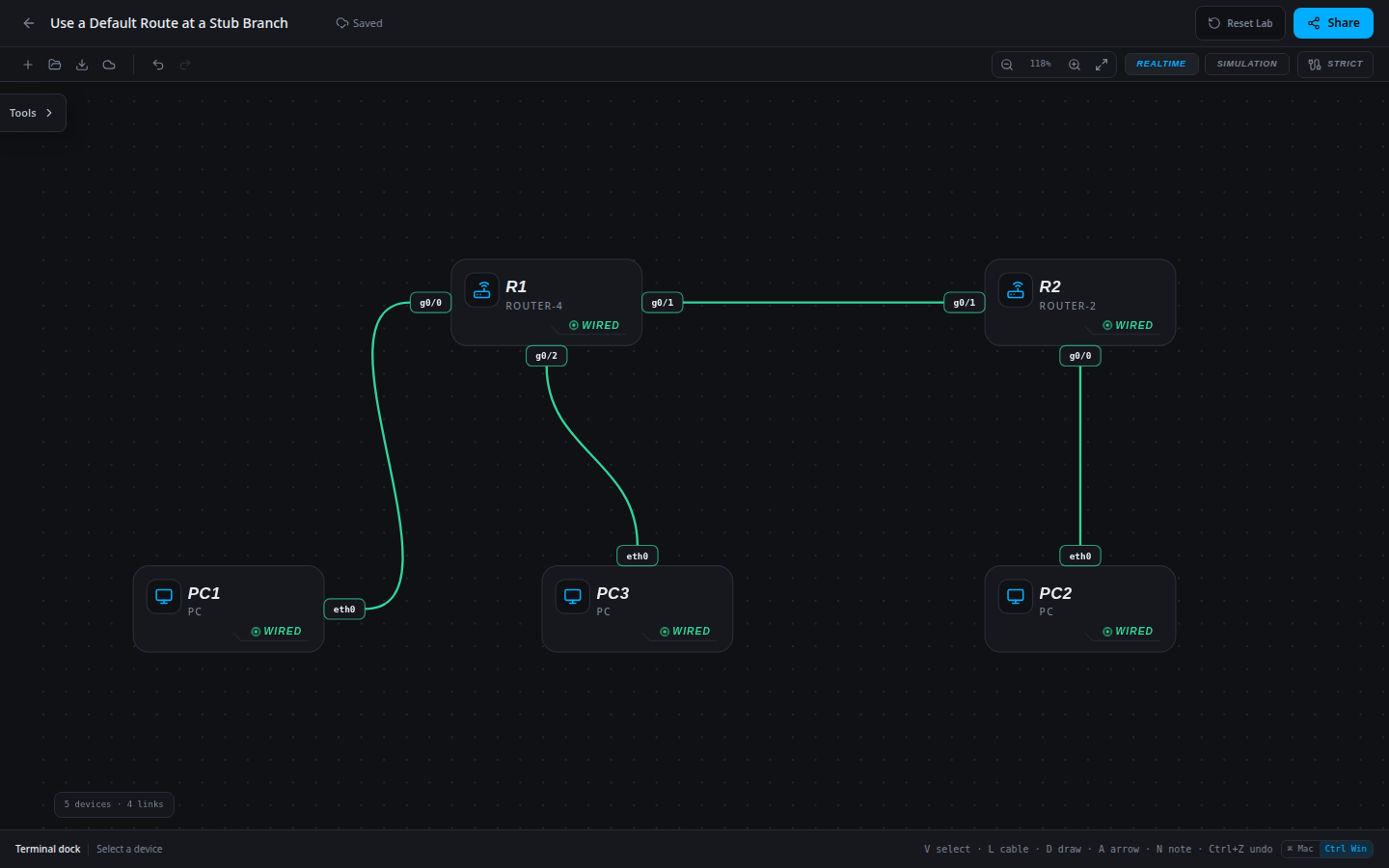
5 devices · 4 links
Scenario
HQ now has two internal LANs, while the branch still has only one upstream router. Rather than maintaining separate branch routes for every HQ LAN, configure its single exit as the default. HQ already knows the branch prefix.
Objectives
- Explain when a single default route is appropriate for a stub site.
- Install a default through the adjacent upstream router.
- Verify two different remote LANs using the same default and retain local connectivity.
CCNA blueprint
200-301 v1.1 objectives — this lab covers the following specific skills, not every subtopic in the domain.
- 3.1.a — Identify a static route in the IPv4 routing table.
- 3.1.d — Verify the next-hop address.
- 3.1.f — Identify the gateway of last resort.
- 3.3.a — Configure and verify an IPv4 default route at a stub site.
Starting information
- R1 has two directly connected HQ LANs: 10.10.10.0/24 on g0/0 and 10.30.30.0/24 on g0/2.
- R2 serves the branch 10.20.20.0/24 and has one upstream peer, 10.0.12.1. R1 already has the branch /24 route.
- Add a single default route on R2; do not add separate routes for the two HQ LANs. All interfaces and hosts are correctly addressed.
| Host | IPv4 address | Mask | Gateway |
|---|---|---|---|
| PC1 | 10.10.10.10 | 255.255.255.0 | 10.10.10.1 |
| PC2 | 10.20.20.20 | 255.255.255.0 | 10.20.20.1 |
| PC3 | 10.30.30.30 | 255.255.255.0 | 10.30.30.1 |
| Router | Interface | IPv4 address | Mask |
|---|---|---|---|
| R1 | g0/0 | 10.10.10.1 | 255.255.255.0 |
| R1 | g0/1 | 10.0.12.1 | 255.255.255.252 |
| R1 | g0/2 | 10.30.30.1 | 255.255.255.0 |
| R2 | g0/0 | 10.20.20.1 | 255.255.255.0 |
| R2 | g0/1 | 10.0.12.2 | 255.255.255.252 |
| Device / port | Device / port |
|---|---|
| PC1 / eth0 | R1 / g0/0 |
| R1 / g0/1 | R2 / g0/1 |
| PC2 / eth0 | R2 / g0/0 |
| PC3 / eth0 | R1 / g0/2 |
Tasks
- From PC2 test its gateway and both HQ workstations. Predict how one forwarding rule could cover both remote destinations.
- On R2 enter
ip route 0.0.0.0 0.0.0.0 10.0.12.1in global configuration. The all-zero prefix and mask match destinations with no more-specific installed route. - Inspect R2’s gateway of last resort and default route. Confirm its branch /24 is still connected rather than forwarded upstream.
- Test PC2 to both HQ hosts, then test each HQ host back to PC2. Explain why HQ still needs its specific branch route.
Useful commands
show ip interface brief
show ip route
show running-config
ping 10.0.12.2
ip route <network> <mask> <next-hop>
copy running-config startup-config
Progressive hints
Hint 1
The branch has one exit toward both remote networks. A default route represents that common exit.
Hint 2
The destination and mask for an IPv4 default route are both 0.0.0.0. The next hop remains a real adjacent router address.
Hint 3
Use 10.0.12.1 as the branch’s next hop. Verify the gateway of last resort, then test both 10.10.10.10 and 10.30.30.30.
Verification
- Before configuration, PC2 reaches 10.20.20.1 but cannot complete exchanges with either HQ PC.
- R2 installs a static default 0.0.0.0/0 via 10.0.12.1 and retains its connected branch route.
- PC2 reaches both 10.10.10.10 and 10.30.30.30. Both HQ hosts reach PC2 at 10.20.20.20.
- R1 retains the specific branch /24 route; the branch default is not a substitute for HQ’s return decision.
Solution / walkthrough
Show Solution
Use enable only from a > prompt; if already at #, begin with configure terminal.
R2
The upstream R1 owns both HQ LANs. A default handles either destination while a more-specific connected route continues serving the local branch LAN.
enable
configure terminal
ip route 0.0.0.0 0.0.0.0 10.0.12.1
end
copy running-config startup-config
Run every verification check above after the changes. A saved configuration alone does not prove packet delivery.