Open the lab
[ YOUR LAB FILE ]
Download the starting topology, then work through the lesson in SwitchLab.
- Save the .swlab file without renaming its extension.
- Open SwitchLab. Import and export controls currently require a desktop-width window. On a smaller screen, Tools → Fit brings the topology into view.
- Select Import Sandbox (folder icon), choose the downloaded file, and confirm the device and cable counts below.
- Select a device, then choose Open device on desktop or its name in the bottom bar on smaller screens. Select CLI for switches/routers or Desktop → Terminal for PCs. Enter
enableonly when the prompt ends in >. - Follow this page beside the simulator. Use a free account to export your work. Reimport the original download to restart; export any work you want to keep first.
Prerequisites
- Read interface status, routing tables, and IOS running configuration.
- Understand OSPF process IDs, router IDs, area 0, and passive interfaces.
- Complete the static routing lab or demonstrate equivalent routing knowledge.
Topology
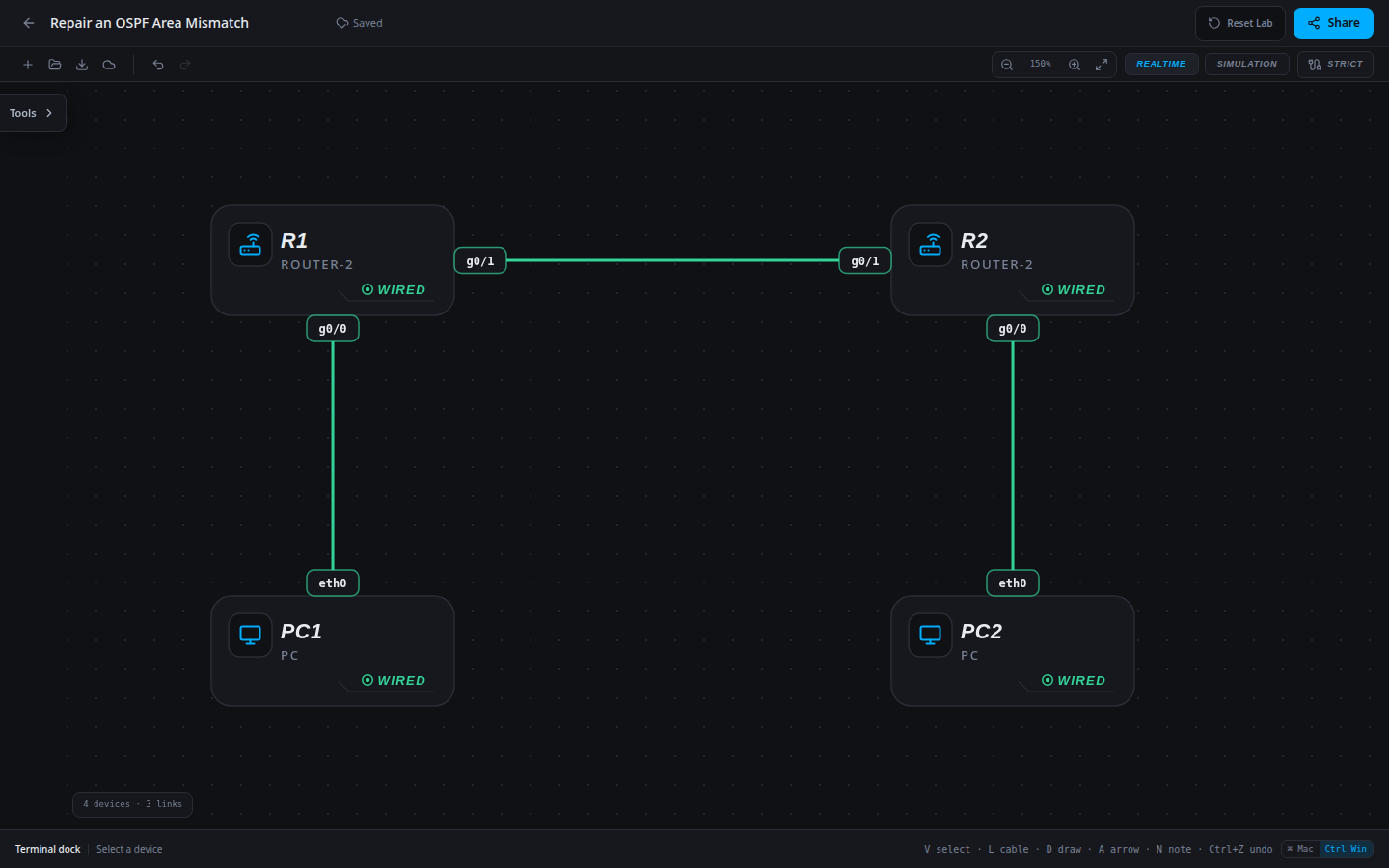
4 devices · 3 links
Scenario
An area number was changed during a routing cleanup. Both local gateways and the peer transit address still respond, but the OSPF neighbor is gone. The approved design is a single backbone area. Find and remove the contradictory interface participation.
Objectives
- Separate transit IP reachability from OSPF area compatibility.
- Identify and replace the wrong-area network statement.
- Verify FULL adjacency and both OSPF LAN routes after a minimal repair.
CCNA blueprint
200-301 v1.1 objectives — this lab covers the following specific skills, not every subtopic in the domain.
- 3.4.a — Troubleshoot single-area OSPFv2 neighbor adjacency.
- 3.4.d — Identify peers by router ID.
- 3.1.a — Distinguish OSPF-learned routes from connected routes.
Starting information
- All OSPF interfaces in this topology must use area 0. The R1 configuration is the reference.
- R2 contains one incorrect transit-area assignment. Host addressing, masks and cabling are correct.
- Retain process 1, router IDs, both LAN advertisements and passive LAN interfaces.
| Host | IPv4 address | Mask | Gateway |
|---|---|---|---|
| PC1 | 10.10.10.10 | 255.255.255.0 | 10.10.10.1 |
| PC2 | 10.20.20.20 | 255.255.255.0 | 10.20.20.1 |
| Router | Interface | IPv4 address | Mask |
|---|---|---|---|
| R1 | g0/0 | 10.10.10.1 | 255.255.255.0 |
| R1 | g0/1 | 10.0.12.1 | 255.255.255.252 |
| R2 | g0/0 | 10.20.20.1 | 255.255.255.0 |
| R2 | g0/1 | 10.0.12.2 | 255.255.255.252 |
| Device / port | Device / port |
|---|---|
| PC1 / eth0 | R1 / g0/0 |
| R1 / g0/1 | R2 / g0/1 |
| PC2 / eth0 | R2 / g0/0 |
Tasks
- Prove local gateway and transit reachability, then inspect the empty neighbor tables.
- Compare OSPF network statements on both routers. Identify the statement that selects R2 g0/1 and the area it assigns.
- Remove the incorrect statement before adding the approved area-0 statement. Keep R1 unchanged and retain R2’s LAN advertisement.
- Verify neighbors, both remote LAN prefixes and both workstation pings. Explain why changing workstation gateways would not fix this incident.
Useful commands
show ip interface brief
show ip ospf neighbor
show ip ospf interface brief
show ip route
show running-config
copy running-config startup-config
Progressive hints
Hint 1
A successful transit ping rules out some IPv4 faults, but does not check OSPF area agreement.
Hint 2
Match each OSPF network statement against the local g0/1 address. Compare the selected areas at the two link endpoints.
Hint 3
Under R2 process 1, remove the 10.0.12.0/30 statement for area 1, then add it for area 0. Do not leave overlapping conflicting statements.
Verification
- Before repair the peer IPv4 address responds but no FULL neighbor is present.
- R2 has a single transit statement for 10.0.12.0 with wildcard 0.0.0.3 in area 0; the area-1 version is absent.
- R1 sees 2.2.2.2 FULL; R2 sees 1.1.1.1 FULL. Both learn the remote LAN through OSPF.
- PC1 and PC2 can ping each other in both directions without added static routes.
Solution / walkthrough
Show Solution
Use enable only from a > prompt; if already at #, begin with configure terminal.
R2
The peer interfaces must agree on area. Replacing the specific mismatched statement preserves the functioning LAN participation and all addressing.
enable
configure terminal
router ospf 1
no network 10.0.12.0 0.0.0.3 area 1
network 10.0.12.0 0.0.0.3 area 0
end
copy running-config startup-config
Run every verification check above after the changes. A saved configuration alone does not prove packet delivery.