Open the lab
[ YOUR LAB FILE ]
Download the starting topology, then work through the lesson in SwitchLab.
- Save the .swlab file without renaming its extension.
- Open SwitchLab. Import and export controls currently require a desktop-width window. On a smaller screen, Tools → Fit brings the topology into view.
- Select Import Sandbox (folder icon), choose the downloaded file, and confirm the device and cable counts below.
- Select a device, then choose Open device on desktop or its name in the bottom bar on smaller screens. Select CLI for switches/routers or Desktop → Terminal for PCs. Enter
enableonly when the prompt ends in >. - Follow this page beside the simulator. Use a free account to export your work. Reimport the original download to restart; export any work you want to keep first.
Prerequisites
- Complete the VLAN and trunking progression.
- Understand that redundant Layer 2 paths need loop prevention.
Topology
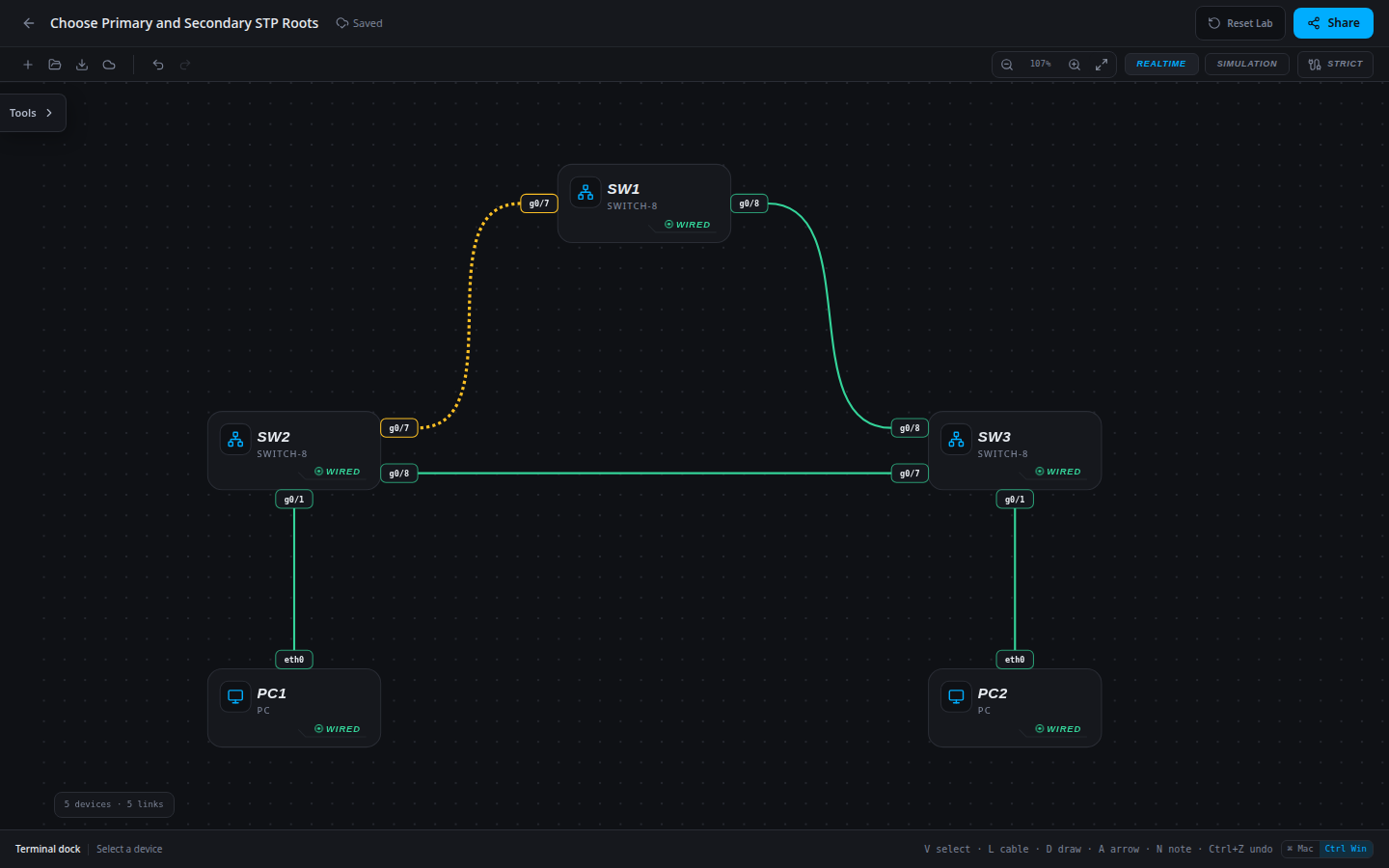
5 devices · 5 links
Scenario
An access switch currently wins the VLAN 10 election. The design calls for SW1 as primary and SW2 as the preferred backup. Apply explicit priorities and verify the resulting roles.
Objectives
- Determine the root from operational spanning-tree output.
- Verify explicit bridge priorities and converged host forwarding.
CCNA blueprint
200-301 v1.1 objectives — this lab covers the following specific skills, not every subtopic in the domain.
- 2.5 — Interpret Rapid PVST+ root election, port roles and steady-state redundancy.
Starting information
- Approved VLAN 10 priorities: SW1=0, SW2=4096, SW3=32768.
- Keep every trunk, host membership and IP address unchanged.
- A secondary root is a design preference expressed by bridge priority; it is not a separate live STP root while the primary remains available.
| Host | IPv4 address | Mask | Gateway |
|---|---|---|---|
| PC1 | 192.168.10.10 | 255.255.255.0 | None |
| PC2 | 192.168.10.20 | 255.255.255.0 | None |
| Device / port | Device / port |
|---|---|
| SW1 / g0/7 | SW2 / g0/7 |
| SW1 / g0/8 | SW3 / g0/8 |
| SW2 / g0/8 | SW3 / g0/7 |
| PC1 / eth0 | SW2 / g0/1 |
| PC2 / eth0 | SW3 / g0/1 |
Tasks
- Record the existing root and bridge priorities from all three switches.
- Apply the approved priorities using
spanning-tree vlan 10 priorityon each switch. - Verify that SW1 reports itself as root and the other switches have root-facing paths. Confirm SW2 has a lower bridge priority than SW3.
- Test both directions of host traffic and document why ping alone cannot prove the intended root placement.
Useful commands
show spanning-tree vlan 10
show running-config
copy running-config startup-config
Progressive hints
Hint 1
Check the bridge priority before using MAC addresses to break an election tie.
Hint 2
A working ping proves delivery but does not tell you whether the intended switch is the root.
Hint 3
Use show spanning-tree vlan 10 on each switch; set only the priorities specified in the approved plan.
Verification
- The intended root reports This bridge is the root for its assigned VLAN.
- Configured bridge priorities match the approved primary and backup design.
- Both directions of each department’s traffic succeed after the final restoration.
Solution / walkthrough
Show Solution
Use enable only from a > prompt; if already at #, begin with configure terminal.
SW1
Set explicit bridge priorities so root placement follows the approved topology rather than the default MAC-address tie-breaker.
enable
configure terminal
spanning-tree vlan 10 priority 0
end
copy running-config startup-config
SW2
Set explicit bridge priorities so root placement follows the approved topology rather than the default MAC-address tie-breaker.
enable
configure terminal
spanning-tree vlan 10 priority 4096
end
copy running-config startup-config
SW3
Set explicit bridge priorities so root placement follows the approved topology rather than the default MAC-address tie-breaker.
enable
configure terminal
spanning-tree vlan 10 priority 32768
end
copy running-config startup-config
Run every verification check above after the changes. A saved configuration alone does not prove packet delivery.