EtherChannel (a.k.a. Link Aggregation, LAG, port-channel) takes two or more physical interfaces and presents them to the rest of the stack as a single logical link. STP sees one port, MAC learning happens once, and traffic load-balances across the members by hash. If a member dies the others keep forwarding — instant failover, no reconvergence. It's one of the highest-leverage features at the access/distribution layer, and the CCNA wants you to know all three flavours.
The three modes split on one question: do the two switches negotiate the channel, and if so, with whose protocol? PaGP is Cisco's, LACP is the open standard (IEEE 802.3ad), and static skips negotiation entirely and just forces the bundle on both sides. This lab builds all three in one topology so you can configure them back-to-back and feel the difference.
★ WHY ETHERCHANNEL EXISTS
Three problems EtherChannel solves at once:
Two 1 Gbps members give you up to 2 Gbps of aggregate throughput across the bundle. Hash-based load-balancing (src/dst MAC, src/dst IP, or both) spreads flows across members. Note that any single flow still rides one physical link — EtherChannel multiplies capacity for the aggregate, not for one TCP session.
Without aggregation, two parallel links between two switches form a loop — STP blocks one and you've paid for a port that does nothing. With EtherChannel, STP sees a single logical port; both physical links forward, no block.
Lose a member and the bundle keeps running on the survivors — no STP reconvergence, no routing-protocol re-adjacency. Convergence is sub-second because the upper layers never see a topology change.
★ THE THREE MODES — REFERENCE
Memorize the keyword pairs. The CCNA will hand you a config snippet and ask whether the channel forms.
| PROTOCOL | MODES | FORMS? | NOTES |
|---|---|---|---|
| PaGP | desirable / auto | desirable+desirable ✓ desirable+auto ✓ auto+auto ✗ | Cisco-proprietary. "Desirable" speaks; "auto" only replies. Two silent sides never form. |
| LACP | active / passive | active+active ✓ active+passive ✓ passive+passive ✗ | IEEE 802.3ad — open standard. Works with any vendor. Same speak/reply rule as PaGP. |
| Static | on / on | on+on ✓ on+anything else ✗ | No negotiation — both sides just declare "this is a channel". Misconfig = loop, no protocol to catch it. |
One side PaGP, other side LACP? Channel won't form. One side on (static), other side desirable? Same result — and worse, the static side will forward as if the channel is up, creating a STP-bypassing loop the moment two members go live. Both ends must use the same protocol family.
★ TOPOLOGY & ADDRESSING
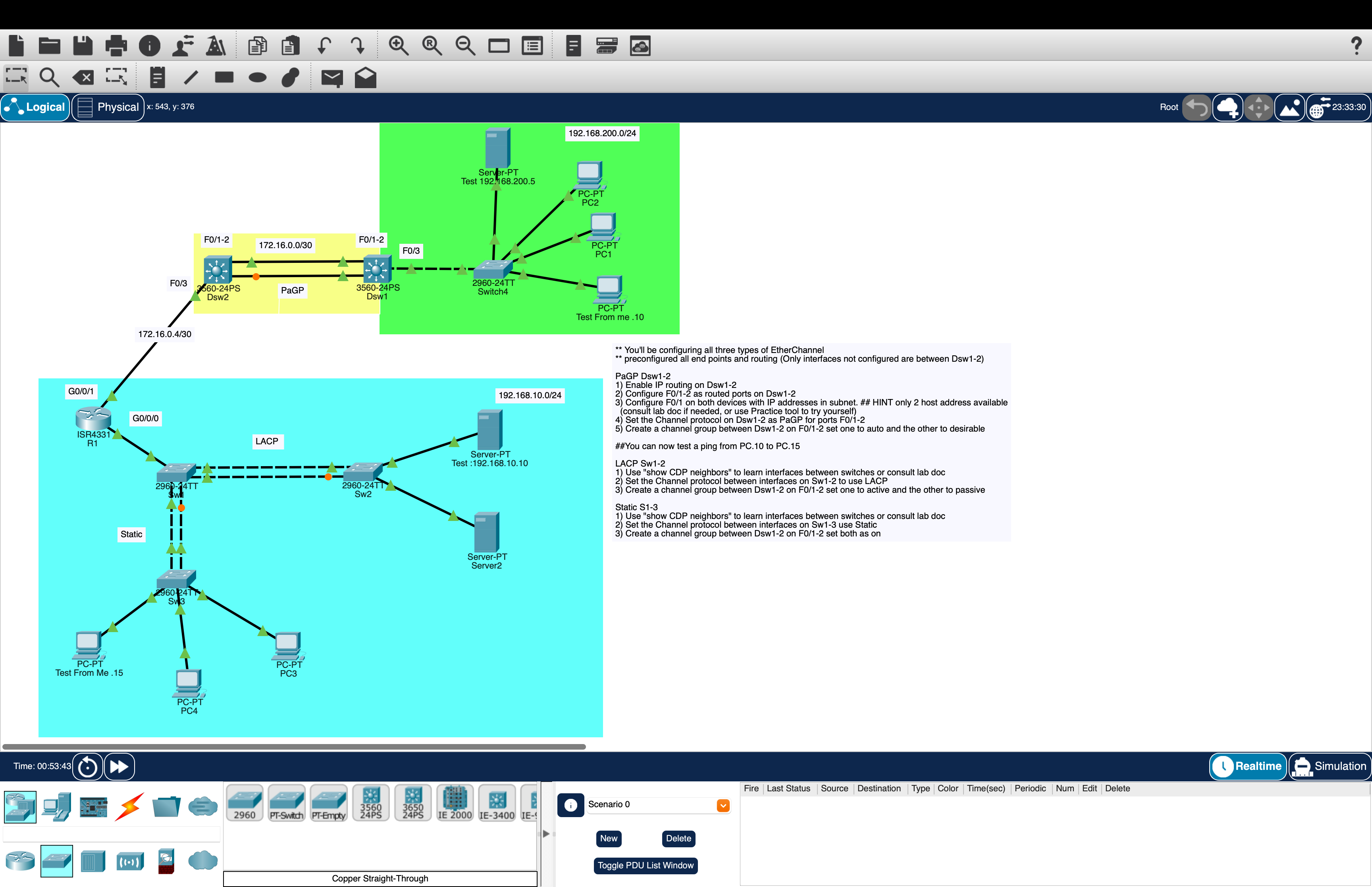
The .pkt ships with everything addressed and routed except the two F0/1-2 links between Dsw1 and Dsw2. Endpoints, DHCP pools, and the SVI gateways on each distribution switch are already in place — you bring up just the three EtherChannels.
| DEVICE | INTERFACE / ROLE | IP / NOTES | STATUS |
|---|---|---|---|
| Dsw1 | SVI (server-LAN gw) | 192.168.200.254/24 | PRE |
| Dsw1 | Po1 (F0/1-2) → Dsw2 — PaGP | 172.16.0.1/30 | YOU |
| Dsw2 | SVI (PC-LAN gw) | 192.168.10.254/24 | PRE |
| Dsw2 | Po1 (F0/1-2) → Dsw1 — PaGP | 172.16.0.2/30 | YOU |
| Sw1 | Po1 → Sw2 — LACP | L2 trunk | YOU |
| Sw1 | Po2 → Sw3 — Static | L2 trunk | YOU |
| Sw2 | Po1 → Sw1 — LACP | L2 trunk | YOU |
| Sw3 | Po1 → Sw1 — Static | L2 trunk | YOU |
| Server-FT | Test server (server LAN) | 192.168.200.5/24 (static) | PRE |
| Test (svr) | Test host (server LAN) | 192.168.200.10/24 (static) | PRE |
| Test (PC) | Test host (PC LAN) | 192.168.10.10/24 (static) | PRE |
| Test (PC) | Test host (PC LAN) | 192.168.10.15/24 (static) | PRE |
| PC1–PC4 | Workstations (PC LAN) | DHCP from 192.168.10.0/24 | PRE |
Routing between the two LANs is handled at the L3 SVIs on Dsw1 (server-LAN gateway) and Dsw2 (PC-LAN gateway). The PaGP port-channel between them is the only L3 transit — when it's down, the two LANs can't talk. When it's up, every PC and every server can reach the other side.
★ TASK 1 — PAGP, ROUTED PORT-CHANNEL ON DSW1 ↔ DSW2
This is the only L3 EtherChannel in the lab. Four things to get right, in order:
- Enable IP routing. Off by default on multilayer switches in older IOS images.
- Convert F0/1 and F0/2 to routed ports.
no switchporton each — switchports can't hold an IP. - Bundle them.
channel-group 1 mode <auto|desirable>createsPort-channel 1automatically. - Address the bundle. The IP goes on
Port-channel 1— never on the physical members.
Do no switchport before channel-group. If you bundle first, IOS auto-creates Po1 as a switchport, the IP refuses to apply to a switchport, and you'll fight error messages. Wipe and start over is faster than untangling.
The /30 subnet: 172.16.0.0/30 gives exactly two usable hosts — .1 for Dsw1 and .2 for Dsw2. That's the "only 2 host addresses available" hint in the lab summary.
One side "desirable" actively speaks PaGP; the other side "auto" silently replies. The combo forms a bundle. Two "auto" sides would never speak and the channel would never form — a classic exam trap.
Verify before moving on. The show etherchannel summary output is the single most useful command in this lab — it tells you the protocol, the mode flags, and whether the bundle is up.
You should now be able to ping from PC.10 (a DHCP host on 192.168.10.0/24) to 192.168.10.254 (Dsw2 gateway), to 192.168.200.254 (Dsw1 gateway across the new PaGP link), and through to a server on 192.168.200.0/24. If routing is pre-configured correctly, end-to-end ping should work the moment Po1 comes up.
★ TASK 2 — LACP, L2 BUNDLE ON SW1 ↔ SW2
Same pattern as Task 1, simpler config. These are L2 access switches — no ip routing, no no switchport, no IP on the bundle. Three steps:
- Discover the links.
show cdp neighborsto confirm which interfaces face Sw2. - Make them trunk ports.
switchport mode trunkon both members. - Bundle them.
channel-group 1 mode <active|passive>— at least one side must beactiveor the channel never forms.
Read straight off the table: Sw2 sits on Sw1's F0/4-5 (LACP — this task) and Sw3 sits on F0/2-3 (Static — Task 3). R1 on F0/1 is part of the pre-configured routing path and isn't touched in this lab. Always run CDP first on a new topology — guessing port assignments is how single-member bundles get built.
channel-protocol lacp explicitly pins the interface to LACP (defensive — prevents a future PaGP mode keyword from being accepted). channel-group 1 mode active is what actually creates the bundle and sets the negotiation behaviour. You can skip the channel-protocol line in most cases; the mode keyword implies the protocol. Include it when you want IOS to refuse foot-gun edits later.
★ TASK 3 — STATIC, NO NEGOTIATION ON SW1 ↔ SW3
Static EtherChannel is the simplest config and the most dangerous — no protocol watches for misconfig, so a one-sided mistake creates a loop. Use it only when you fully control both sides and know the cabling is right.
Three steps, same shape as Task 2:
- Discover the links.
show cdp neighborsto confirm both ports peer with Sw3. - Make them trunk ports.
switchport mode trunkon both members. - Force the bundle.
channel-group 2 mode onon Sw1 (Po1 is taken by the LACP bundle),channel-group 1 mode onon Sw3. Both sides must beon— no negotiation at all.
Both sides must be mode on. on paired with desirable, auto, active, or passive won't form a bundle — the negotiating side keeps trying to speak a protocol the static side ignores.
★ VERIFY — END-TO-END PING
All three bundles up, two L2 trunks at the access layer on the PC side, one L3 link transiting between subnets. From the static test PC on the PC LAN, ping the server.
One timeout on first ping is the ARP resolution; subsequent pings are clean. Trace the path to see which routers and switches the packet crosses.
Three EtherChannels carried the frame: static (or LACP) to reach Sw1, then the L2 trunks up to Dsw2, then PaGP across the L3 routed Po1 to Dsw1, then out the server SVI to Server-FT. One ping, all three modes touched.
★ COMMON GOTCHAS
Symptom: Channel won't form. show etherchannel summary shows interfaces standalone (I) instead of bundled (P).
Fix: Both sides must use the same protocol family. PaGP on one end + LACP on the other never bundles. Static (on) only pairs with static (on).
Symptom: LACP passive+passive or PaGP auto+auto — links come up physically but the bundle never forms.
Fix: At least one side must speak first. Set one end to active (LACP) or desirable (PaGP). The other can stay quiet.
Symptom: Channel forms with only some members, others suspended (s flag).
Fix: Members must match on speed, duplex, and trunk/access mode. Use interface range to configure both ports identically — that's its main purpose here.
Symptom: PaGP channel up, but ping to the /30 peer fails.
Fix: The IP goes on Port-channel 1, not on F0/1 or F0/2. If you applied the address to a physical member before bundling, remove it — only the Po1 address is active.
Symptom: One side on, the other side desirable or active. Links forward independently as standalone ports. STP blocks one, the other forwards — looks like a working "channel" until you notice only one member is up.
Worse case: With STP disabled on either side, both members forward and you've built a loop. Always match modes end-to-end.
★ VERIFICATION CHEAT SHEET
★ THINGS WORTH TRIGGERING
Start a continuous ping from the PC test host to 192.168.200.5. On Dsw1, shut F0/1 (one of the PaGP members). The ping should not drop — Po1 keeps forwarding on F0/2 alone, and show etherchannel summary shows the surviving member still bundled (P) while the down member shows D. no shutdown the member and watch it rejoin the bundle without disturbing traffic.
On Dsw1 change Po1's mode to auto: interface range f0/1 - 2 then channel-group 1 mode auto. Both sides are now silent. The bundle drops; show etherchannel summary shows I (standalone) on every member. End-to-end ping breaks. Set Dsw1 back to desirable to recover.
On Sw2 swap LACP for PaGP: channel-group 1 mode desirable in place of active. Sw1 is still speaking LACP. The channel won't form. Look at show etherchannel summary on both sides — the protocol column shows different protocols and the ports go standalone. Roll back to confirm.
Default load-balancing on most Catalyst platforms is src-mac — every frame from one source MAC takes the same member. Run show etherchannel load-balance and try port-channel load-balance src-dst-ip at global config. The hash changes; flows redistribute.
★ COMPARE TO LAB 4 — THE STP CONNECTION
In Lab 4 (RSTP) you watched STP block one of two parallel links between switches — half your bandwidth, paid for and unused. EtherChannel is the surgical answer: same two cables, both forwarding, STP sees one logical port. Most production access/distribution designs use both — RSTP for loop prevention between port-channels, EtherChannel to make each set of parallel members behave as one port.
★ LAB DOWNLOAD
Built and tested in Packet Tracer 8.x. All endpoints, DHCP, SVIs, and routing are pre-configured — you build all three EtherChannels and prove end-to-end ping. Plan on ~30 minutes.
Three EtherChannel modes in one topology, end-to-end ping when bundled ⬇ DOWNLOAD .PKT
EtherChannel on real switches gives you a real "pull-the-cable, watch-the-bundle-survive" demo. Two 2960X's plus a console cable covers everything in this lab. Amazon affiliate.