Open the lab
[ YOUR LAB FILE ]
Download the starting topology, then work through the lesson in SwitchLab.
- Save the .swlab file without renaming its extension.
- Open SwitchLab. Import and export controls currently require a desktop-width window. On a smaller screen, Tools → Fit brings the topology into view.
- Select Import Sandbox (folder icon), choose the downloaded file, and confirm the device and cable counts below.
- Select a device, then choose Open device on desktop or its name in the bottom bar on smaller screens. Select CLI for switches/routers or Desktop → Terminal for PCs. Enter
enableonly when the prompt ends in >. - Follow this page beside the simulator. Use a free account to export your work. Reimport the original download to restart; export any work you want to keep first.
Prerequisites
- Complete the focused lessons for the features used in this scenario.
- For campus policy scenarios, complete VLANs, trunks, IPv4, OSPF and ACL lessons first.
Topology
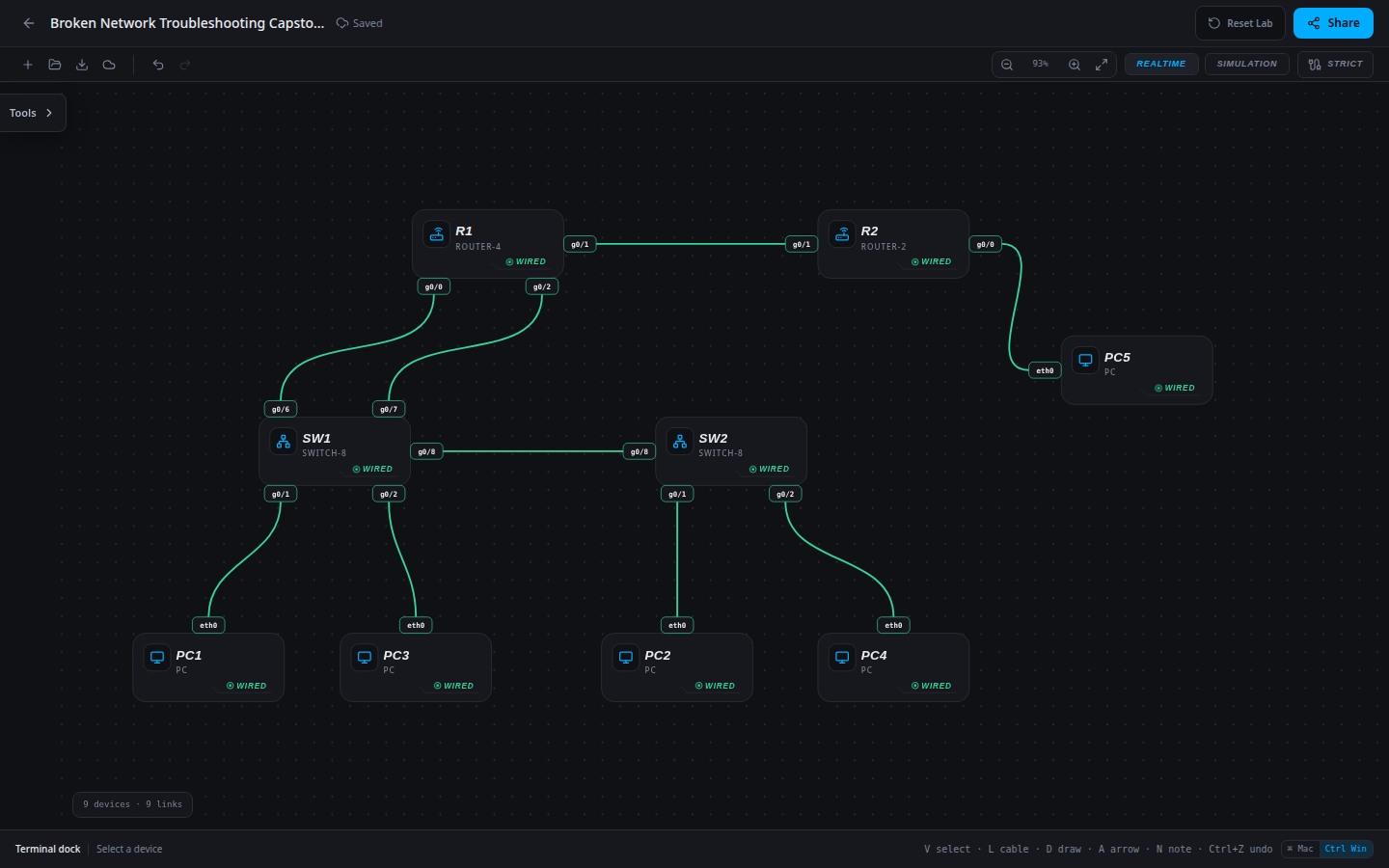
9 devices · 9 links
Scenario
A failed change combined workstation, uplink, routing and security edits. Users retain some local access, Staff loses its remote closet and the resource path is down. Restore the approved design without removing the resource restriction.
Objectives
- Implement or restore the approved network design without breaking required control paths.
- Verify configuration, end-to-end behavior and completed-network persistence.
- Produce an operational handoff with evidence and a deterministic reset path.
CCNA blueprint
200-301 v1.1 objectives — this lab covers the following specific skills, not every subtopic in the domain.
- 1.6 — Apply and verify the scenario’s IPv4 addressing.
- 2.1.a — Verify data access-port membership.
- 2.2 — Verify the restricted interswitch trunk.
- 3.4 — Configure or repair single-area OSPF.
- 5.6 — Enforce the specified IPv4 access policy.
Starting information
- USERS VLAN 10: PC1/PC2, subnet 10.10.10.0/24, gateway R1 g0/0=10.10.10.1. STAFF VLAN 20: PC3/PC4, subnet 10.20.20.0/24, gateway R1 g0/2=10.20.20.1.
- SW1/SW2 g0/1 are Users ports and g0/2 are Staff ports. Their g0/8 trunk carries exactly VLANs 10,20. SW1 g0/6 connects to the Users gateway; SW1 g0/7 connects to the Staff gateway.
- R1 g0/1=172.16.12.1/30 connects to R2 g0/1=172.16.12.2/30. R2 g0/0=10.30.30.1/24 serves PC5=10.30.30.50.
- Use single-area OSPF process 1: router IDs R1=1.1.1.1 and R2=2.2.2.2, area 0 on transit and LAN prefixes, LAN interfaces passive. No static routes are required.
- Access policy: Users PC1/PC2 must not reach PC5; Staff PC3/PC4 may reach PC5. Apply ACL 101 outbound on R1 g0/1. Inter-department campus traffic remains permitted.
| Host | IPv4 address | Mask | Gateway |
|---|---|---|---|
| PC1 | 10.10.10.10 | 255.255.255.0 | 10.10.10.254 |
| PC2 | 10.10.10.20 | 255.255.255.0 | 10.10.10.1 |
| PC3 | 10.20.20.30 | 255.255.255.0 | 10.20.20.1 |
| PC4 | 10.20.20.40 | 255.255.255.0 | 10.20.20.1 |
| PC5 | 10.30.30.50 | 255.255.255.0 | 10.30.30.1 |
| Router | Interface | IPv4 address | Mask |
|---|---|---|---|
| R1 | g0/0 | 10.10.10.1 | 255.255.255.0 |
| R1 | g0/2 | 10.20.20.1 | 255.255.255.0 |
| R1 | g0/1 | 172.16.12.1 | 255.255.255.252 |
| R2 | g0/0 | 10.30.30.1 | 255.255.255.0 |
| R2 | g0/1 | 172.16.12.2 | 255.255.255.252 |
| Device / port | Device / port |
|---|---|
| PC1 / eth0 | SW1 / g0/1 |
| PC2 / eth0 | SW2 / g0/1 |
| PC3 / eth0 | SW1 / g0/2 |
| PC4 / eth0 | SW2 / g0/2 |
| SW1 / g0/8 | SW2 / g0/8 |
| SW1 / g0/6 | R1 / g0/0 |
| SW1 / g0/7 | R1 / g0/2 |
| R1 / g0/1 | R2 / g0/1 |
| R2 / g0/0 | PC5 / eth0 |
Tasks
- Record symptoms from both departments and divide the investigation into local switching, host gateways, OSPF adjacency and resource policy.
- Find all four discrepancies against the approved plan. Document a hypothesis and supporting output for each before changing it.
- Repair the faults in dependency order; do not treat an early successful ping as completion or remove the required ACL.
- Verify the full positive and negative matrix, save/export/reload and write an incident handoff listing root causes, changes and evidence.
Useful commands
show vlan brief
show interfaces trunk
show running-config
show ip ospf neighbor
show ip route
copy running-config startup-config
Progressive hints
Hint 1
Break the end-to-end path into host settings, local VLAN carriage, gateway reachability, route selection and any access policy.
Hint 2
Use a working control at each layer. Do not remove security controls or add broad routes just to make one ping succeed.
Hint 3
Compare each affected host, interface and route against the approved plan; use the earlier focused lessons for the exact command patterns.
Verification
- The final network matches every approved addressing, VLAN, routing and policy requirement above.
- Every required positive path succeeds and every forbidden path remains blocked.
- Completed export/reload retains the result; reimporting the starter restores the original exercise.
Solution / walkthrough
Show Solution
Use enable only from a > prompt; if already at #, begin with configure terminal.
PC1
Repair PC1’s off-subnet forwarding choice without changing its local identity.
netsh ip set 10.10.10.10 255.255.255.0 10.10.10.1SW2
Restore the missing Staff VLAN on the remote closet trunk.
enable
configure terminal
interface g0/8
switchport trunk allowed vlan 10,20
end
copy running-config startup-config
R2
Restore the transit adjacency while keeping the resource LAN passive.
enable
configure terminal
router ospf 1
no passive-interface g0/1
end
copy running-config startup-config
R1
Replace the ACL that targeted Staff with the approved Users restriction; preserve Staff access to PC5.
enable
configure terminal
no access-list 101
access-list 101 deny ip 10.10.10.0 0.0.0.255 host 10.30.30.50
access-list 101 permit ip any any
interface g0/1
ip access-group 101 out
exit
end
copy running-config startup-config
Run every verification check above after the changes. A saved configuration alone does not prove packet delivery.