Open the lab
[ YOUR LAB FILE ]
Download the starting topology, then work through the lesson in SwitchLab.
- Save the .swlab file without renaming its extension.
- Open SwitchLab. Import and export controls currently require a desktop-width window. On a smaller screen, Tools → Fit brings the topology into view.
- Select Import Sandbox (folder icon), choose the downloaded file, and confirm the device and cable counts below.
- Select a device, then choose Open device on desktop or its name in the bottom bar on smaller screens. Select CLI for switches/routers or Desktop → Terminal for PCs. Enter
enableonly when the prompt ends in >. - Follow this page beside the simulator. Use a free account to export your work. Reimport the original download to restart; export any work you want to keep first.
Prerequisites
- Complete IPv4 addressing and static routing.
- Recognize IPv6 hexadecimal addresses and /64 prefixes.
Topology
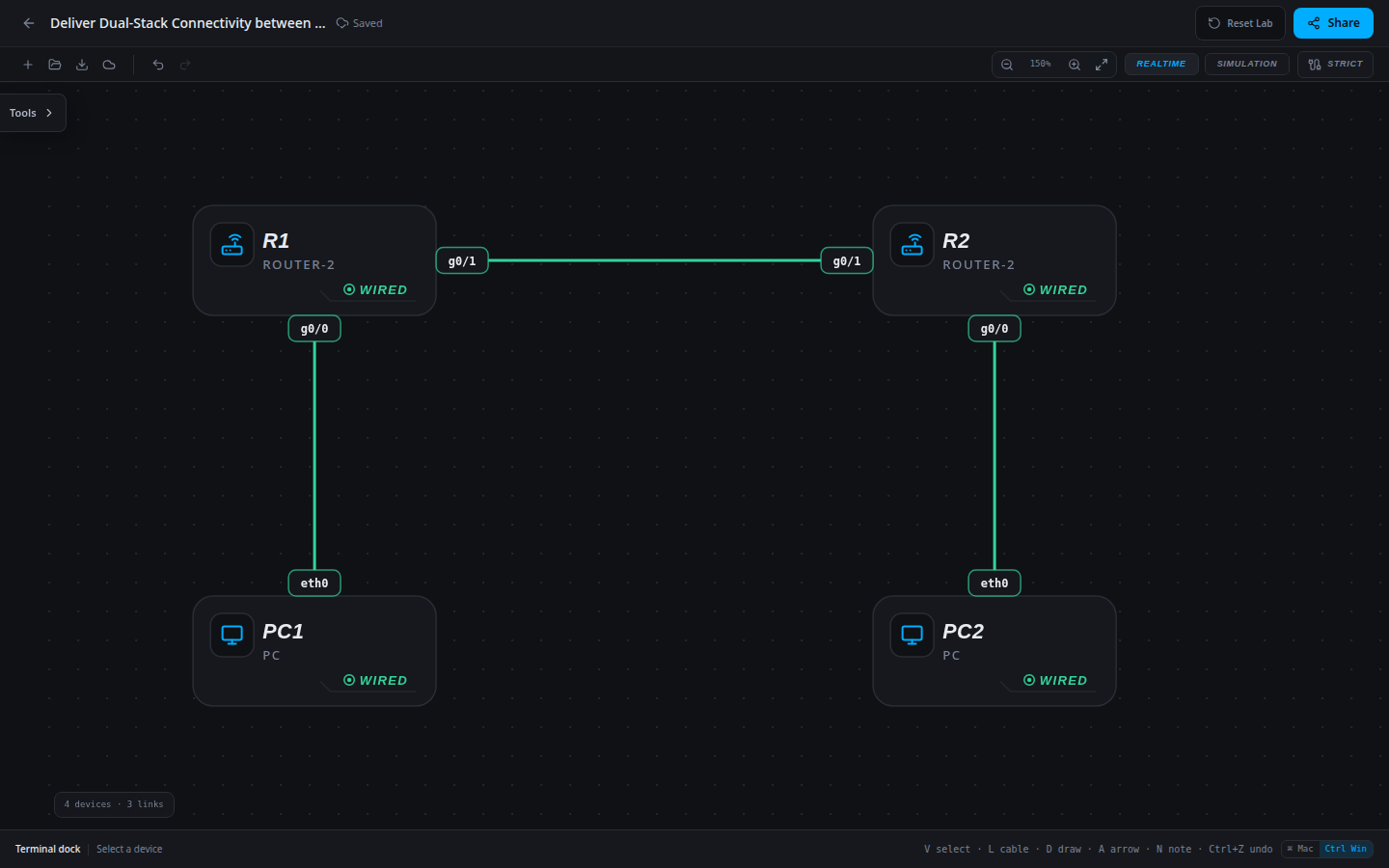
4 devices · 3 links
Scenario
A branch rollout requires both address families. IPv4 interfaces and all hosts are pre-addressed, but site routes and router IPv6 configuration are unfinished. Complete the approved plan without treating one successful address family as proof of the other.
Objectives
- Verify IPv6 interface addressing and the host gateway relationship.
- Prove IPv6 forward and return delivery independently of IPv4.
CCNA blueprint
200-301 v1.1 objectives — this lab covers the following specific skills, not every subtopic in the domain.
- 1.8 — Configure and verify IPv6 addressing and prefixes.
- 3.3 — Configure and verify IPv6 static routes.
Starting information
- R1 g0/0: 2001:db8:10::1/64; R2 g0/0: 2001:db8:20::1/64. Hosts and IPv6 gateways are listed below.
- Transit: R1 g0/1=2001:db8:12::1/64 and R2 g0/1=2001:db8:12::2/64.
- Use a specific route to the remote /64 through the peer’s transit address. Preserve the IPv4 plan shown in the starter table.
- These reserved documentation prefixes are for this isolated lab. IPv6 forwarding is configured separately from IPv4.
| Host | IPv4 address | Mask | Gateway |
|---|---|---|---|
| PC1 | 10.10.10.10 | 255.255.255.0 | 10.10.10.1 |
| PC2 | 10.20.20.20 | 255.255.255.0 | 10.20.20.1 |
| Host | IPv6 address | Prefix length | IPv6 gateway |
|---|---|---|---|
| PC1 | 2001:db8:10::10 | 64 | 2001:db8:10::1 |
| PC2 | 2001:db8:20::20 | 64 | 2001:db8:20::1 |
| Router | Interface | IPv4 address | Mask |
|---|---|---|---|
| R1 | g0/0 | 10.10.10.1 | 255.255.255.0 |
| R1 | g0/1 | 10.0.12.1 | 255.255.255.252 |
| R2 | g0/0 | 10.20.20.1 | 255.255.255.0 |
| R2 | g0/1 | 10.0.12.2 | 255.255.255.252 |
| Device / port | Device / port |
|---|---|
| PC1 / eth0 | R1 / g0/0 |
| R1 / g0/1 | R2 / g0/1 |
| PC2 / eth0 | R2 / g0/0 |
Tasks
- Inspect each PC’s
ipconfig /all, each router’sshow ipv6 interface briefandshow ipv6 route, and baseline both address families. - Apply only the configuration required by this scenario using the approved LAN and transit plan.
- Verify the intended connected /64 prefixes and each remote route. Check both ends; an outbound route alone does not provide a return path.
- From PC1 ping 2001:db8:20::20; from PC2 ping 2001:db8:10::10. Also verify the IPv4 control path, then save/export and reload.
Useful commands
show ipv6 interface brief
show ipv6 route
show running-config
copy running-config startup-config
Progressive hints
Hint 1
Use the working IPv4 network only as a physical-path control; it cannot prove the IPv6 configuration.
Hint 2
Compare each host’s /64 and gateway with its attached router interface, then inspect the remote route and next hop.
Hint 3
The remote IPv6 route on R1 uses next hop 2001:db8:12::2; R2 uses 2001:db8:12::1. R1’s LAN must be in 2001:db8:10::/64.
Verification
- Both IPv6 host-to-host directions succeed.
- The IPv4 control path also succeeds after completion.
- The repaired or completed IPv6 interface and route configuration survives export/reload.
Solution / walkthrough
Show Solution
Use enable only from a > prompt; if already at #, begin with configure terminal.
R1
Use the approved documentation prefixes and directly reachable IPv6 next hop. IPv4 and IPv6 route tables are independent; verify both when the task requests dual stack.
enable
configure terminal
ipv6 unicast-routing
interface g0/0
ipv6 address 2001:db8:10::1/64
exit
interface g0/1
ipv6 address 2001:db8:12::1/64
exit
ipv6 route 2001:db8:20::/64 2001:db8:12::2
ip route 10.20.20.0 255.255.255.0 10.0.12.2
end
copy running-config startup-config
R2
Use the approved documentation prefixes and directly reachable IPv6 next hop. IPv4 and IPv6 route tables are independent; verify both when the task requests dual stack.
enable
configure terminal
ipv6 unicast-routing
interface g0/0
ipv6 address 2001:db8:20::1/64
exit
interface g0/1
ipv6 address 2001:db8:12::2/64
exit
ipv6 route 2001:db8:10::/64 2001:db8:12::1
ip route 10.10.10.0 255.255.255.0 10.0.12.1
end
copy running-config startup-config
Run every verification check above after the changes. A saved configuration alone does not prove packet delivery.